


If a course evaluation has been created for you (usually by the administration office responsible for your study program), you have the option of adding up to four individual questions, provided that the “Optional questions” field has been activated for you.
step 1: You will receive an e-mail notifying you that a course evaluation is ready for you to edit.

Step 2: If you follow the attached link, you will be taken directly to the registration form to enter the optional questions for this course evaluation. You can add up to two optional questions and two rating scale questions.
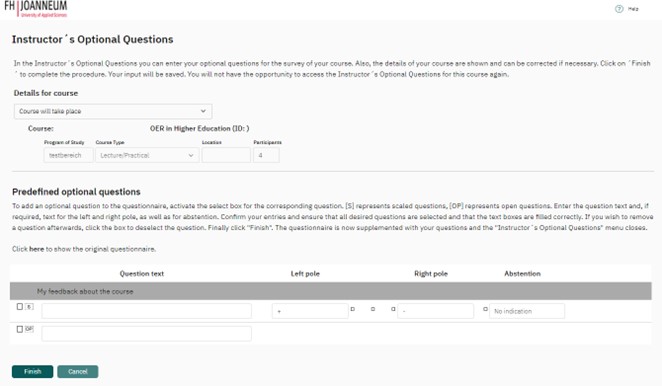
To view the original questionnaire , you can self enrol in the Moodle course “Evaluation and Evaluation Culture”
Step 3: When satisfied with your entries, click ‘Finish’.

The entry of these questions is optional. Please note that once submitted, they cannot be edited again.
Step 4: Clicking on the link in the email again will result in the following feedback:

NOTE: You must enter and save your own questions not later than one day before the survey starts.